Stepping into the world of precise cooking can transform your culinary results from good to absolutely glorious. If you’ve ever wrestled with an overcooked roast or an underdone chicken, you know the frustration. That’s where a reliable companion like the Thermopro Wireless Meat Thermometer comes into play, turning guesswork into gourmet. This isn’t just another gadget; it’s your secret weapon for achieving perfect doneness every single time, without constantly hovering over your grill or oven.
From Guesswork to Gourmet: The Essential Role of a Meat Thermometer
For centuries, cooks relied on touch, sight, and intuition to gauge when meat was ready. While these methods can be honed with practice, they leave little room for error when it comes to food safety and achieving that melt-in-your-mouth texture. Knowing the exact internal temperature of your protein is paramount, not just for taste, but for health. Proper cooking eliminates harmful bacteria, ensuring every meal is both delicious and safe.
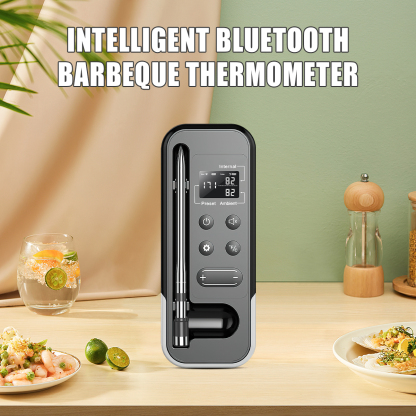
The ThermoPro Edge: Why Wireless Makes a Difference
Enter the modern era of cooking, where technology lends a helping hand. ThermoPro has emerged as a leading name in accurate temperature monitoring, particularly with its range of wireless meat thermometers. The real game-changer here is the “wireless” aspect. Imagine hosting a barbecue, mingling with guests, or simply relaxing indoors while your roast or brisket cooks to perfection outside. A ThermoPro wireless meat thermometer liberates you from being tethered to your cooking appliance, allowing you to monitor temperatures remotely, often from hundreds of feet away. This freedom significantly reduces stress, making cooking a more enjoyable and confident experience.
Unpacking the Power: Key Features of ThermoPro Wireless Meat Thermometers
ThermoPro offers a variety of wireless models, each boasting features designed to cater to different cooking styles and needs. While specific functionalities may vary between models like the popular TP20, TP25, or TP27B, several core strengths define the ThermoPro wireless meat thermometer experience.
- Extended Range & Reliable Connectivity: Many ThermoPro wireless thermometers utilize advanced radio frequency (RF) technology, offering an impressive range, often up to 500 feet or more, allowing you to move freely around your home and yard. Other models leverage Bluetooth technology, which connects directly to a user-friendly app on your smartphone, providing even more detailed control and data logging. Whether RF or Bluetooth, the goal is consistent, reliable communication between your probes and your remote display or phone.
- Precision Probes for Every Purpose: You’ll typically find high-quality, stainless steel probes designed to withstand extreme temperatures, making them suitable for grilling, roasting, and smoking. Many ThermoPro models come with multiple probes – some even four, like the TP25 – enabling you to monitor different cuts of meat simultaneously or track both meat and ambient grill temperature. These probes are engineered for accuracy, providing readings within seconds.
- Intuitive Displays & Smart Alarms: A clear, often backlit, LCD display is a hallmark of ThermoPro’s wireless offerings, ensuring readability even in low light. Beyond just showing temperatures, these devices come equipped with customizable alarms. You can set a target temperature, and the unit will alert you (audibly, visually, or even with vibration on some receivers) when your food reaches doneness. Many models, such as the TP20, also include pre-programmed USDA-recommended temperatures for various types of meat and doneness levels, taking the guesswork out of safe cooking.
- Durability and Thoughtful Design: ThermoPro wireless meat thermometers are built to last, often featuring splash-resistant designs that can handle the rigors of a busy kitchen or outdoor cooking environment. Features like foldable stands, magnetic backs for easy mounting, and robust probe cables highlight the brand’s commitment to user-friendly and durable products.
Your First Cook: A Step-by-Step Guide to Using Your ThermoPro Wireless Meat Thermometer
Using a ThermoPro wireless meat thermometer is surprisingly straightforward, even for first-timers. Here’s a general guide to get you started on your journey to perfect cooks:
- Powering Up & Pairing: Begin by inserting the recommended batteries into both the transmitter (the unit connected to the probes) and the receiver (your remote monitoring device). Most ThermoPro wireless units will automatically pair or require a simple button press to establish a connection. Consult your specific model’s manual for exact instructions.
- Probe Placement Perfection: This is crucial for accurate readings. Insert the probe into the thickest part of the meat, ensuring it avoids any bones, gristle, or large pockets of fat, as these can give misleading temperature readings. If using multiple probes, place them in different cuts or to monitor ambient temperature.
- Setting Your Target Temperature: Your ThermoPro will likely offer pre-programmed settings for beef, poultry, pork, etc., with options for rare, medium, well-done. Simply scroll through these options until you find your desired setting. Alternatively, you can manually set a custom target temperature if you have a specific recipe in mind.
- Remote Monitoring Made Easy: Once the probes are in and the settings are confirmed, you’re free to move. Take your receiver or smartphone (if using a Bluetooth model) with you. The display will show the current internal temperature of your meat and often the ambient temperature of your oven or grill. You can watch the temperature rise in real-time without disturbing your cook.
- Responding to Alarms: When your meat reaches its target temperature, your ThermoPro wireless meat thermometer will sound an alarm, and often the display will flash. This is your cue! Carefully remove your meat from the heat source.
Smart Tips for Perfect Results with Your ThermoPro
To truly master your ThermoPro wireless meat thermometer and ensure consistent, delicious results every time, keep these expert tips in mind:
- The Importance of Calibration: While ThermoPro thermometers are factory-calibrated, it’s a good practice to periodically check their accuracy, especially if you suspect inconsistent readings. A simple ice-water bath or boiling-water test can verify if your probes are performing correctly.
- Mind the Resting Period: Once your meat reaches its target temperature and is removed from the heat, don’t cut into it immediately! Allowing meat to rest for 5-15 minutes (depending on size) lets the juices redistribute, resulting in a more tender and flavorful product. The internal temperature will also continue to rise slightly during this period, known as “carryover cooking.”
- Cleaning for Longevity: Always clean your probes thoroughly after each use. A simple wipe with a damp cloth and mild soap is usually sufficient. Avoid submerging the probe connectors or the main transmitter unit in water.
- Smart Storage Solutions: Store your probes and transmitter/receiver in a dry place. Many ThermoPro models come with storage cases or have built-in features like magnetic backs to help keep your device protected and organized.
- Troubleshooting Common Queries: If you experience connectivity issues, check battery levels and ensure you’re within range. For inaccurate readings, try recalibrating or cleaning the probes thoroughly. The user manual is always your best friend for specific troubleshooting steps.
Expert Insight:
“A reliable ThermoPro wireless meat thermometer isn’t just about perfectly cooked food; it’s about confidence and convenience,” explains Chef Anya Sharma, a culinary technologist and avid home cook. “It removes the stress of constantly checking your food, giving you the freedom to enjoy your cooking process and spend more time with loved ones, knowing that culinary perfection is just an alarm away.”
Why Go Wireless with ThermoPro? The Benefits Beyond the Grill
Investing in a ThermoPro wireless meat thermometer brings a host of advantages that elevate your cooking experience and the quality of your meals:
- Achieve Consistent Perfection: Say goodbye to dry, overcooked poultry or tough, underdone roasts. With precise temperature monitoring, you’ll consistently hit that sweet spot of doneness, leading to juicy, tender, and flavorful results every single time.
- Elevated Food Safety: Removing meat from heat at the correct internal temperature is crucial for destroying harmful bacteria. A wireless thermometer ensures you meet USDA safety guidelines, protecting your family and guests from foodborne illnesses.
- Unrivaled Convenience & Freedom: This is perhaps the biggest draw. Monitor your grill or oven from your living room, garden, or even another floor. You’re no longer stuck babysitting your food, freeing you up to prepare sides, entertain, or simply relax.
- Reduced Cooking Stress: No more hovering, guessing, or anxious peeking. The clear readings and timely alarms of a ThermoPro unit allow you to cook with confidence, knowing exactly when your masterpiece is ready.
- Versatility Across Culinary Adventures: Whether you’re smoking a brisket for hours, roasting a holiday turkey, grilling steaks, or even baking bread, a ThermoPro wireless meat thermometer is an indispensable tool that adapts to nearly any cooking method.
Choosing Your Ideal ThermoPro Wireless Meat Thermometer
With several excellent models available, selecting the perfect ThermoPro wireless meat thermometer depends on your specific cooking habits and preferences.
- Consider Your Cooking Environment: Are you primarily grilling outdoors, roasting in an oven, or smoking for long periods? Models with longer ranges (like RF units) might be ideal for extensive outdoor cooking, while Bluetooth models with app integration are fantastic for smart home cooks.
- Connectivity Preferences: Do you prefer a dedicated remote receiver (like the TP20 or TP27B) for simple, no-fuss monitoring, or do you love the idea of controlling and logging temperatures via an app on your smartphone (like the TP25)? Both offer superb functionality; it’s about personal preference.
- Number of Dishes at Once: If you frequently cook multiple items or need to monitor both meat and ambient temperatures, a multi-probe system (like the TP25 with its four probes) will be invaluable. For simpler cooks, a dual-probe unit may suffice.
- Budget and Desired Features: ThermoPro offers options across various price points. Consider which features are non-negotiable for you – perhaps a backlit display, specific alarm types, or a particular range – and choose a model that balances these with your budget. Remember, a ThermoPro is an investment in consistently delicious meals.
Frequently Asked Questions About ThermoPro Wireless Meat Thermometers
Q: What is the typical wireless range I can expect from a ThermoPro unit?
A: The wireless range can vary significantly by model. RF-based ThermoPro wireless meat thermometers often offer ranges of up to 500 feet or more, while Bluetooth models typically provide up to 300-650 feet, depending on environmental factors and obstacles.
Q: Are ThermoPro wireless meat thermometer probes safe to leave in the oven or grill for extended periods?
A: Yes, ThermoPro probes are designed to be left in meat during the entire cooking process in ovens, grills, and smokers. They are made from high-heat resistant stainless steel and can withstand temperatures far exceeding typical cooking temperatures.
Q: How do ThermoPro Bluetooth models compare to RF models?
A: Bluetooth models (e.g., TP25) connect to a smartphone app, offering advanced features like graphing, custom alerts, and recipe management. RF models (e.g., TP20, TP27B) use a dedicated remote receiver, often providing a longer range and a simpler, app-free experience. Both are highly accurate.
Q: Can I set custom temperatures, or am I limited to pre-programmed settings?
A: Most ThermoPro wireless meat thermometers offer both options. You can usually select from pre-programmed USDA-recommended temperatures for various meats and doneness levels, or you can manually set your own custom target temperature to suit a specific recipe or preference.
Q: What should I do if my ThermoPro wireless meat thermometer is showing an error message?
A: An error message often indicates a probe issue (e.g., not fully plugged in, damaged, or exceeding its temperature limit). First, ensure the probe is securely inserted into the transmitter. If the error persists, try using a different probe if you have one, or consult your model’s specific user manual for troubleshooting steps.
The journey to perfect cooking doesn’t have to be a stressful one. With a ThermoPro wireless meat thermometer by your side, you gain not just precision, but also the freedom and confidence to create culinary masterpieces consistently. It’s more than just a tool; it’s an enhancement to your entire cooking lifestyle. So go ahead, embrace the wireless revolution in your kitchen or backyard, and prepare to impress with every dish. Your taste buds, and your guests, will thank you.